Showing posts with label Eclipse. Show all posts

Tuesday, August 17, 2010

Eclipse Apps Performance Tips

Lets explore some of the tricks to monitor and improve performance of apps running in Eclipse and also how we can write better API.

1. VisualVM is a great tool to monitor the performance of any eclipse application. Once the plugin is installed, any eclipse app can be launched in the VisualVM Runtime instead of a Java Runtime so that the health of the app can be monitored in real-time.

2. If we enable "Show Heap Status" under 'General Preferences', we can periodically enforce GC, which is very important for heap analysis.

3. Now we can really enable in-depth monitoring by turning on Runtime Spy through an .options file e.g. eclipse -debug c:\spy\.options
Here is the Update site for core tools
platform-core - http://eclipse.org/eclipse/platform-core/updates


References :
http://www.jdg2e.com/ch32.performance/doc/index.html#refs
Google Book
http://www.eclipse.org/eclipse/platform-core/downloads/tools/readme.html


Sample settings of the Runtime Spy .options file
#### Monitoring settings
# monitor class loading
org.eclipse.osgi/monitor/classes=true
# monitor bundle activation
org.eclipse.osgi/monitor/activation=true
# monitor resource bundle (*.properties) loading
org.eclipse.osgi/monitor/resources=true
#### Trace settings
# trace class loading - snapshot the execution stack when a class is loaded
org.eclipse.osgi/trace/classLoading=true
# trace location - file in which execution traces are written
org.eclipse.osgi/trace/filename=runtime.traces
# trace filters - Java properties file defining which classes should
# be traced (if trace/classLoading is true)
etc........


4. Well even after enabling all types of monitoring, we still sometimes can not find out why certain apps leads to OutOfMemory Error !
Then the only way out is to generate the Heap Dumps and Thread Dumps.
We can add this vmarg in eclipse.ini -
-Xdump:java+heap+system:events=user,opts=CLASSIC+PHD so that whenever SendSignal is executed corresponding dumps will be generated.


Otherwise we can start eclipse in command prompt as follows and then do Ctrl+break to signal the vm.


eclipse -vm \bin\java.exe -console -consoleLog -vmargs -verbose:class -verbose:dynload -Xms1024m -Xmx1536m -XX:MaxPermSize=128m -Xdump:heap+java:events=user,opts=CLASSIC+PHD -Xgcpolicy:optavgpaus.


Another way to send stop signal to vm - cdb -p -c ".dump /ma java.dmp;q" - Where  is the integer process Id of the java process.


5.  Time to highlight the importance of designing API and SPI using eclipse codebase. 
     This is an invaluable source of knowledge about evolving Eclipse API and proper usage of annotations like 
     @noimplement, @noextend etc.
Its a classic : http://www.eclipse.org/eclipse/development/java-api-evolution.html


6. In order to enforce API Analysis we should refer to - http://www.eclipse-tips.com/tutorials/26-api-tooling-tutorial. After all Eclipse is meant for coding clean interfaces and abstract classes that communicates to users through simple annotations and robust patterns.


7. Its not a bad idea to enforce internationalization – using the setting - org.eclipse.jdt.core.compiler.problem.nonExternalizedStringLiteral=error in .settings file.


Fixing Int issues at the early stage prevents from wasting a good amount of time and introducing unsolicited bugs at the time of product delivery phase.


8. we should flag 'unused imports' as errors in preference to make it a daily habit getting rid of unnecessary evils.


9. Templating try / catch to actually catch and log an exception is a MUST ! Eclipse should fix this by default providing a exception.printStackTrace() statement. Empty catch blocks are silent killers that remain hidden inside deeply nested api !


10. Remote Debugging Options :
-vmargs
-Xdebug
-Xnoagent
-Djava.compiler=NONE
-Xrunjdwp:transport=dt_socket,server=y,suspend=n,address=9000

11. How to enforce annotations for api ?
http://www.eclipse-tips.com/tutorials/26-api-tooling-tutorial
--  enforce usage of @since, @noimplement annotations

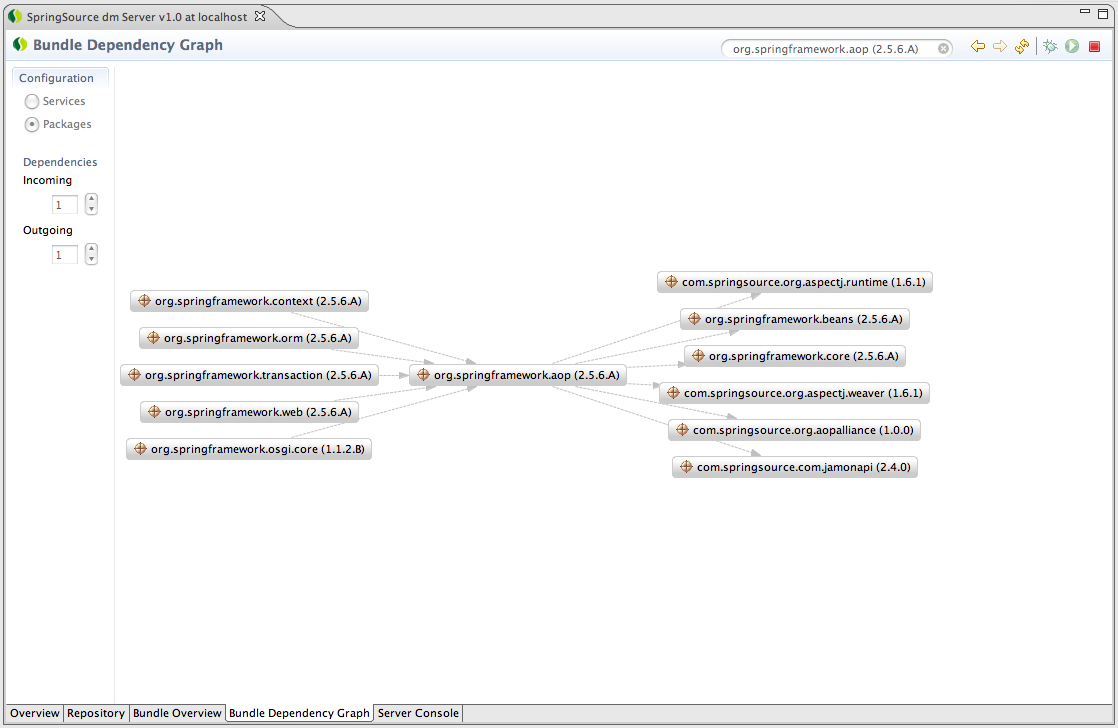
12. How to view OSGi dependency and search plugin dependency ?


13. The last but not the least FindBug (http://findbugs.cs.umd.edu/eclipse) should be part of development environment and be actively used.


Well ... a bonus tip for hackers :-) ... don't forget the decompiler plugin -http://java.decompiler.free.fr/jd-eclipse/update-  using which you can even debug any class that essentially do not have source base shipped with its tool !  

Friday, May 7, 2010

Making Applications work together in Eclipse

Eclipse as we know is a great implementation of plugin-architecture.

We decouple different components of a system into bundles.
plugin-architecture is very simplistic in nature, highly extensible and modular at the cost of a tricky class-loading policy.
Actually Eclipse is a story of several class-loaders.
It iniataites a chain of class loaders to load the plug-ins lazily as specified in component-specific manifest.mf files.
If we understand its class-loading policy and learn some tricks, then we can make different third-party jars talk to each other and avoid infamous 'ClassNotFound Exception'.
The immediate parent of a plug-in class loader is the Eclipse Boot Class Loader (providing access to boot.jar). The parent is the standard java system class loader which terminates the chain. The Application Class-loader which loads classes from the system's CLASSPATH is not part of the chain.
That's why while loading product components, Eclipse does not look into Classpath in contrast to any other java-based client applications.
On start-up, the eclipse platform builds a shadow of all the plugins by reading all the manifest files into a plug-in registry.
Whenever a plugin com.xyz.myProduct is started by Eclipse Application Class,
the class-loader for com.xyz.myProduct takes-off.
If com.myProduct.xyz tries to access any class from another plugin com.myProduct.abc,
Eclipse invokes the Plug-in Class-loader coresponding to com.myProduct.abc.
That's the essence of Eclipse OSGi.

Q1. How to use third-party applications while building and running my product ?
Its of no use to specify third-party jars in classpath.
While building the application com.myProduct, we should bundle all the required jars in a single plugin (com.myProduct.library) and expose the apis of the bundled log4j, jpox, xstream etc.

Q2. How a third-party jar (log4j.jar) can see the classes from com.myProduct.xyz.jar during runtime ?
Lets assume com.abc.myProduct plugin logs messages using log4j.
So during runtime, log4j needs to see the classes from com.myProduct.abc plugin
This can be achieved by registering log4j with Eclipse-Buddy Policy and specifying com.abc.myProduct as a buddy of log4j.
# log4j Manifest.MF
Bundle-Name: org.apache.log4j
Bundle-Version: 1.2.13
...
Eclipse-BuddyPolicy: registered

# myplugin Manifest.MF
Bundle-Name: com.abc.myProduct
Bundle-Version: 1.0.0
Requires-Bundle: org.apache.log4j,...
Eclipse-RegisterBuddy: org.apache.log4j
If anyone registers with log4j as its buddy, and log4j needs to find a class com.abc.myProduct.MyComponent then it will check all the buddies before throwing "ClassNotFound" Exception

Q3. How can users integrate third-party jars with myProduct plugins on-the-fly ?
Lets see how users can actually hack eclipse configuration files to integrate required jars on-the-fly.
>> say user has installed a plugin com.magicScript which allows him to program using any script including jruby. But the product plugin doesn't ship the jruby jars i.e. does not adopt any of the above mechanisms.
So user have to add JRUBY_MOME in eclipse.ini. Now when eclipse will start up it will set jruby home in the path.
Lets assume the com.magicScript plugin already depends on a plugin com.magicScript.library containing a lib folder.
Next the jruby.jar needs to be placed inside the lib folder and the location lib\jruby.jar needs to be specified in the manifest.mf of com.magicScript.library.
Finally, starting eclipse with -clean -Intialization option will automatically first set Jruby path and then invoking magicScript perspective will trigger the classLoader for the bundle com.magicScript.library which in turn will load jruby classes from the jar (as specified in manifest.mf).
Thus user will be able to code/compile/run jruby.
This same trick can be used if we want the user to dynamically specify a DB driver jar and connect to a db using a plugin already installed in his environment.
Say com.myProduct.dbExplorer plugin will load classes from the jar to be specified by users during runtime.
(4) So far we depend only on Eclipse Bundle-ClassLoader and we configure eclipse in such a way (either development-time / runtime) that all required jars will be loaded by the classloader of the bundle in which jars are packed.
But what if we need to access a class which can not be loaded by the bundle-classloader ?
We need to set certain jars in custom classloader so the classes bundled in the jar can be loaded on demand !

A typical scenario is com.xyz.MyProduct.library contains scriptDebugger.jar (some 3rdparty jar) whose api need to be invoked during runtime and the api class will access some class of jruby.jar (may be specified by user during runtime) which can't be packed inside the product.
//The follwoing piece-of-code should be part of the com.xyz.myProduct.ScriptManager to load classes from jruby jar that user will specify during runtime.
// gather the names and loacation of jars as provided by user through preference page after product is deployed.
String[] jarslist = DynamicJarLoader.getThirdPartyJars();
URL[] jarURLs = new URL[jarslist.length];
JarFileLoader newLoader = new JarFileLoader(jarURLs);
for (int i = 0; i < jarslist.length; i++) {
newLoader.addFile (jarslist[i]);
}
class JarFileLoader extends URLClassLoader
{
public JarFileLoader (URL[] urls)
{
super (urls);
}

public void addFile (String path) throws MalformedURLException
{
String urlPath = "jar:file://" + path + "!/";
addURL (new URL (urlPath));
}
}
Now swap bundleclassloader with your classloader !
ClassLoader currentLoader = Thread.currentThread().getContextClassLoader();
try {
current.setContextClassLoader( newLoader);
// Either Load reqd. classes and work with them
newLoader.loadClass ("org.jruby.JRubyClient");
newLoader.loadClass ("org.hsqldb.jdbcDriver");
newLoader.loadClass("oracle.jdbc.driver.OracleDriver");
// Or invoke some other api (of scriptRunner.jar which will load JRuby classes to compile/run jruby script)
}catch(Exception exception) {
exception.printStackTrace();
}finally { // Restore Eclipse Bundle Class-loader
current.setContextClassLoader(oldLoader);
}
further reading : http://www.eclipsezone.com/articles/eclipse-vms/

How to load a file placed inside a plugin ?

String pluginID = "com.examples.eclipse.test";
String baseSegment = "Samples";
String fileName = "testProject.zip";

org.eclipse.emf.common.util.URI uri = org.eclipse.emf.common.util.URI
.createPlatformPluginURI(pluginID, true);
uri = uri.appendSegments(new String[] { baseSegment, fileName});

uri = CommonPlugin.resolve(uri);

String path = uri.toFileString();

File resolvedFile = new File(path);

How to load emf resource from a plugin jar

Lets assume that an emf resource file has been contributed to an extension-point.
Now while reading the extension points; one can find out the name of the plugin.

IConfigurationElement[] elements = extensions[i].getConfigurationElements();
IContributor contributor = elements[j].getContributor();
String bundleId = contributor.getName();

URI uri = URI.createPlatformPluginURI("/" + bundleId + "/"+ filePath, true);
Resource resource = ResourceSetFactory.getResourceSet().createResource(uri);
resource .load(null);
EList contents = resource .getContents();

How to customize the copy functionality of EcoreUtil ?

EcoreUtil.Copier testCopier = new Ecoreutil.Copier() {

protected void copyContainment(EReference eRef, EObject eObj, EObject copyEObj) {
// skip the unwanted feature
if(eRef != unwanted_feature) {
super.copyContainment(eRef, eObj, copyEobj);
}
}
//
testCopier.copyAll(testObjects);
testCopier.copyReferences();
//

to be continued ..

Eclipse Modelling Best Practies

1. We should have a single in-memory instance of the working model of an emf resource .
* It should be the a single point contact for managing the lifecycle and behavior of the emf model.

* It should contain the corresponding editing domain, reference to the file resource and the global resource set.

* It should maintain a single copy of the domain model in the memory.
getModel(IResource resource):EObject

* It should maintain the list of cross-references for the model in context
getReferences():List

* It should be a resource-change listener so that
* * it can unload the model and delete the emf resource when the file resource is deleted
* * it can modify the resource-uri when the file is moved / renamed
addListener(PropertyChangeListener propertyChangeListener)

* ModelProvider should also register all required ItemAdapterFactories and provide the composite adapter factory
getAdapterFactory() : AdapterFactory

* It should take care of saving the Resource, provide ResourceSaveable and check if the resource is dirty.

* Whenever the resource uri is changed then using EcoreUtil CrossReferencer ModelProvider should find out what all models should be refactored.

* It should be deleted (resource.delete()) whenever the file resource is deleted

* It should be reloaded when its dirty editor is closed without saving its changes.

2. Item Provider is the single-most powerful feature in EMF
* Implement content and label provider by using mixing interfaces through delegate pattern.
Public Object[] getchilren(Object object){
ITreeItemContentProvider adapter = (ITreeItemContentProvider)adapterFactory.adapt
(object, ITreeItemContentProvider.class);
return adpter.getChildren(object).toArray();
}
* adapt the model objects to implement whatever interfaces the editors and views need
* propagate the change-notifications to viewers
* act as command factory
* provide a property source for model objects

3.Effective usage of Common Command Fwk
* getResult() should be overridden to return relevant model objects so that
** result of one command can be input to another command
** getAffectedObjects() will give the affected model objects for which the the required diagram element or xml node or language statement or property section can be selected and highlighted.

4. How to synch up the WorkingModel with changes in file Resource ?
Lets assume WorkingModel has the methods addListener(PropertyChangeListener propertyChangeListener) and removeListener(PropertyChangeListener propertyChangeListener);

The Editor then is added as a propertyChangeListner for its workingModel
if (propertyChangeListner == null) {
propertyChangeListner = new PropertyChangeListener() {
public void propertyChange(PropertyChangeEvent evt) {
if (WorkingModel.PROP_DIRTY.equals(evt.getPropertyName())) {
editorDirtyStateChanged();
} else if (WorkingCopy.PROP_RELOADED.equals(evt.getPropertyName())) {
reloadModel(currentFile);
} else if (WorkingCopy.PROP_REMOVED.equals(evt.getPropertyName())) {
Object newLocation = evt.getNewValue();
if(newLocation == null) { // file deleted
removeWorkingModel();
close(false);
}else if (newLocation instanceof IPath) {
// file renamed
IFile newFile = ResourcesPlugin.getWorkspace().getRoot().getFile((IPath)
newLocation);
if (newFile != null && newFile.exists()) {
reloadModel(newFile);
} else {
close(false);
}
} else {
close(false);
}
}
}

protected void reloadModel(IFile newFile) {
try {
IDE.openEditor(getSite().getPage(), newFile);
} catch (PartInitException e) {
ErrorDialog.openError(getSite().getShell(),
"Error in editor initialization", null, e.getStatus());
}
close(false);
}

5. How to find References of an EObject ?
Collection referrers = EcoreUtil.UsageCrossReferencer.find(eo, eo.eResource());
iterate through the references : referer.getEObject()

6. Why Notification Listeners in EMF are also called Adapters ?
Apart from observing the changes in eObjects, they also help - extending the behavior i.e. support additional interfaces without subclassing - (Adapter pattern)

7. Attaching an adapter :
(i) Attaching an Adapter as Observer :
Adapter myEObjectObserver = // make an ui component
implement org.eclipse.emf.common.notify.Adapter
myEObject.eAdapters().add(myEObjectObserver);
myEObjectObserver will be notified whenever the eobject is modified
(ii) Attaching an Adapter as a Behaviour Extension :
MyEObject myEObject =
AdapterFactory myEObjectAdapterFactory =
if(myEObjectAdapterFactory.isFactoryType(myEObjectType)){
Adapter myEObjectObserver= myEObjectAdapterFactory.adapt(myEObject, myEObjectType);
.....
}

Stay Tuned .. to be continued ..

How to contribute a wizard under export menu group of for a file ?

1. contribute a wizard to 'org.eclipse.ui.exportWizard'
2. then contribute that exportWizard as commonWizard to ' org.eclipse.ui.navigator.navigatorContent' in the 'export' category.
3. specify a property tester to enable the wizard only the required type of file.

Thursday, May 6, 2010

Eclipse : Graphical Model Transformation Framework

In a nutshell:

GMTF generates an MDA tool to carry out the smooth transformation of models through a rich UI.

Problem Space

In order to minimize the chaos, the product vendors are very fast coming up with standard specifications for industry domain models. For example, telecom industry has proposed a common meta-model for telecom products. Similarly, warehouse tools have agreed upon CWM (Common Warehouse Model).Statistical tools trying to adopt a common Predictive Mark-up Modeling Language (PMML). Rule Engines adhere to Ontology Definition Model (ODM). These meta-models are very often referred as Computational Independent Model (CIM).

All these meta-models are by and large approved and governed by OMG.

Of course, the most popular meta-model formats are UML, XSD and Annotated POJO.

In an attempt to ensure synergy and interoperability between different meta-models, OMG has proposed MOF (Meta-Object Facility).

It’s the responsibility of MOF implementers to provide an API that can convert heterogeneous CIMs into a standard Platform Independent Model (PIM - MOF implementation).

Finally, business analysts and domain specific model developers will be happiest, if they can see their CIMs being magically (I mean graphically) transformed into Platform Specific Models (PSMs) i.e. the vendor specific domain.


Solution Approach

Eclipse outscores all other tools in the universe as far as graphical transformation is concerned! We shall see it happening soon.

To address the problem space mentioned above we propose to leverage the powerful modeling features of Eclipse and build a Graphical Modeling Transformation Framework tool.

The tool aims at providing a robust CIM2PIM and PIM2PSM converter API.

** Detailed tutorial and code-coverage is out-of-scope for this article and will be covered in the future articles.

MDA: The backbone of GMTF

Model-driven architecture (MDA™) is a software design approach launched by the Object Management Group in 2001. MDA supports model-driven engineering of software systems. MDA provides a set of guidelines for structuring specifications expressed as models.

Model Driven Architecture takes the following approach:

  • Capturing the business requirement (CWM/SBVR/ODM/Telecom Model) using a Computation Independent Model (CIM – e.g. XSD/UML/XMI).

  • Then defining the system functionality into platform-independent model (PIM - e.g. EMOF) using an appropriate Domain Specific Language (e.g. eclipse EMF).

  • Finally, given a Platform Definition Model (PDM - e.g. eclipse GMF vocabulary) corresponding to CORBA, Dot Net, the Web, etc., the PIM is translated to one or more platform-specific models (PSMs - e.g. UML with domain specific stereotype).

Computers can run PSM, using different Domain Specific Languages, or a General Purpose Language like Java, C#, Python, etc.

As per OMG, the meta-models (referring to PIMs) extending from OMG EMOF standard are inter-convertible. XML Metadata Interchange (XMI), designed to streamline data integration, is the common format for representing and interchanging those OMG compliant meta-models.

Phases of transformation

Initial: CIM - initial design time representation of the relationship
between entities in all application domains (e.g. Banking, health, finance, telecom, aerospace)

Intermediate: PIM - runtime in-memory structure in all implementation platforms

Final: PSM - structure of persisted data.

Graphically Editing the PSM: GMTF in action

Visual Representation of PSM

UML is a visual modelling and design language that in recent years has evolved into the de facto standard for specifying and documenting complex, object-oriented software. UML Superstructure specification deals with visualization of various diagrams.

How to persist and manipulate the diagram notations?

A UML diagram may be stored in XMI format, and conversely, a UML diagram may be created from an XMI file. In the following section we will analyze how GMTF provides a solution to this problem.

Leveraging Eclipse APIs to build the GMTF tool

Eclipse, the sweetheart of product developers all-over the world, makes it so easy to graphically transform a diverse array of models.

Following steps will help us convert CIM to PIM and then PIM to PSM

Step 1: Create the model transformation API.

The Eclipse modelling world revolves around ECORE framework; a great implementation of OMG's EMOF standard. Here we leverage the following features to generate ECORE model and its controller API from a CIM.


Key features of modelling frameworks (ECLIPSE):

  • XMI conformance.

  • Emphasizes Forward Engineering - producing code from abstract, human-elaborated specifications.

  • Reflective API for create/read/update /delete of model

  • Persistence API using custom/ECORE serializer

  • API for converting annotated java model/XSD model/ UML model into ECORE model

  • Strong implementation of command, adapter, decorator and mvc patterns.

  • Proactive validation using OCL and post-build validation showing problem markers

  • Powerful and optimised query API

  • Robust transaction API for managing multiple resources working on the same model.

  • Strong correlation with hibernate API.

  • Auto-synchronization of resource, model, explorers, viewers and editors.


Popular model types

  • UML, EMF, POJO, XSD, CWM, PMML, WSDL, DB Schema

Step 2 : Visualize the ECORE models

Now that we have converted heterogeneous models into ECORE meta-model, the obvious question pops up, “How to visualize the ECORE models graphically?”

Eclipse, the matchmaker has arranged a great marriage between UML meta model (implemented as uml.ecore – the PIM – an extension of OMG’s MOF) and GMF tooling fwk (PDM). The combined soul is lovingly called UML Diagramming Framework (uml2tools plugin)

Eclipse Graphical Modelling Framework (

GMF) is an exemplary implementation

  • A very rich set of APIs to represent an ECORE model in a graphical editor

  • Defines standardized model to describe diagram elements

  • Separates the diagram (view) elements from the semantic (domain model) elements.

  • Models used to define graphics, tooling, mapping

  • Code generation targets runtime.

  • Promotes use of Domain-Specific Languages

  • Huge range of reusable components (action bars, connection handlers, collapsed components, varieties of shapes, routers, property viewers, navigator actions, toolbars, palette tools) for graphical editors.

  • Leverages all standard based technologies for command infrastructure, validation, transitioning, object constraint language, reporting etc.

  • Attempts to follow with the Diagram Interchange specification.

  • Designed for extensibility

GMF Runtime Architecture


GMF provides a standardized model to describe Diagram Elements

Step 2 can be further broken down into the following sub-steps.


a) The Developer needs to specify what all diagram elements (rectangle, ellipse) to be displayed.

GMF Graphical Definition Model

      • A platform-neutral model to define:

      • Figures

      • Nodes and Child Nodes

      • Connections

      • Compartments

      • Diagram Labels

      • Figure Galleries allow for reuse:

      • Share common shapes, labels, connections, etc.

      • Custom figures to allow any GEF figure

      • Wizard provides starter definition from any domain ECORE model


b)The developer needs to configure the drawing palette --
GMF Tool Model

c) Map the ECORE model elements with the drawing tools and figures.i.e. during runtime, as you drag n drop a person tool from the pallete on the editor, a rectangle showing the model element Person will be created.

GMF Mapping Model

      • A model to specify the relationship between:

      • Domain elements (*.ecore)‏

      • Graphical elements (*.gmfgraph)‏

      • Tooling elements (*.gmftool)

      • Allows for audit & metric definitions (both domain and diagram)‏

      • Leverages EMF Validation

      • Domain can be constrained and initialized

      • Leverages EMF OCL

      • Wizard provides starter mapping from existing domain, graphical, and tooling definition

d) Finally, specify how you want your code to be generated! Absolutely amazing!
GMF Code Generation Model
    • A model used to specify code generation parameters

    • Result of transformed mapping model

    • Code generation using JavaTM Emitter Templates (JET)

    • Substitute provided templates with your own

Alter properties for generation as per domain specific look

    • Plug-in provider name, ID, package namespace, etc.

    • Specify runtime options

    • Print support, validation support, file extension, etc.

Diagram persistence (same or separate from domain)

    • Tabbed Properties View

    • Project Explorer (Navigator) support

Hurray! You are done!

The GMTF API infrastructure is ready! (No Coding! Huh.)

Without waiting any longer … just right-click your code generation model and choose

generate code’

A plethora of features get generated and your graphical editor is ready to render any ECORE model …

GMTF Case Study - Seeing is believing!

Okay, enough of designing and coding. Launch your RCP and here comes the Financial Analysts.

The following picture summarizes how a Financial Analyst can convert a CIM into a finance domain specific model using our GMTF tool.

Rose UML > UML Ecore PIM > Bank PSM using eclipse GMF PDM

Annotated POJO > UML PIM > BPMN PSM using eclipse GMF PDM

XSD > EMF model > Finance PSM


Scenario – 1

In the GMTF tool’s eclipse perspective,

  • User selects a Finance Models folder of the Finance project in the explorer.

  • User opens an import wizard to select a model (java /xsd /rose uml /wsdl /db schema/ pmml etc.)

  • User finishes the wizard:

Behind the scene,

    • The Model Converter API (Step 1) will invoke appropriate builder (Java2Ecorebuilder /

Xsd2EcoreBuilder/ Uml2Ecorebuilder/ Db2UmlBuilder etc.) to generate the PIM –UML ECORE model.

    • GMF convert the PIM into the uml superstructures (PSM)

    • Then the domain specific (Finance/ HealthCare etc.) stereotypes are applied to the uml model in order to obtain a PDM.

    • Finally GMF persists and displays the PDM using a diagram notational model (an eclipse specific diagram persistence vocabulary).

  • The PDM (domain specific uml model) is rendered on a graphical editor.

e.g. Java Model / WSDL model transformed into Domain Specific UML model.


Scenario-2

User can simply drag and drop a model on to the graphical editor.

e.g. DB Schema transformed into a Domain Specific UML model


Transformation of persistence Format : CIM2PSM


Sample wsdl model : Initial CIM

>>> transformed into Domain Specific UML model : Final PSM Eclipse

This domain specific uml file now can be imported into any other xmi-compliant uml tools (Rational / EA/ Poseidon etc.).

Only the data "behind" the diagram <uml:Model/>… will be transmitted.

The diagram elements will be recreated by importer tools.

Conclusion

Now that GMTF tool presents a beautiful editor, user can enhance the PDM using powerful like connection handlers, collapsed components, varieties of shapes, routers, property viewers, navigator actions, toolbars and palette tools - to just name a few!

GMF has simply revolutionized the visual model techniques with the mantra “XMI Everywhere!”

GMF is fast emerging as the most popular visual modeling framework to build standard notational, tooling and graphical model compliant to OMG modeling specifications, transforming heterogeneous data into domain specific models.

References

Acronyms

XMI - XML Metadata Interchange

EMOF - Essential Meta Object Facility

PMML – Predictive Markup Modeling Language

ODM – Ontology Definition Model

MDA – Model Driven Architecture

PIM – Platform Independent Model

PDM – Platform Definition Model

PSM – Platform Specific Model

SBVR – Standard Business Vocabulary for Rules

CWM – Common Warehouse Management Model